· 6 min read
Keep holiday plans in separate iPhone countdowns
Keep Thanksgiving travel, dinner and Christmas plans in separate iPhone countdowns with Antici. Choose dates, shared reminders and a Home Screen widget.


A holiday can give you several dates to look forward to: the trip there, dinner with family, and a later Christmas gathering. Save each confirmed plan as a separate moment in Antici. Each gets its own date, time and photo, and you can choose which one appears in your Home Screen widget.
In the United States, Thanksgiving is Thursday, November 26, 2026, and Christmas Day is Friday, December 25, 2026. Those dates come from the US Office of Personnel Management holiday schedule. Your departure or family celebration may fall on another day. If you only need the holiday's day count, use the Thanksgiving calculator or Christmas calculator.
For plans you want to keep on your iPhone after closing the calculator, start with the dates you have actually confirmed. Antici requires iOS 26 or later. The free app holds up to five moments and includes a small Home Screen widget; existing saved moments count toward that limit.
Choose a separate target for each plan
Give a countdown a title that tells you what happens when it reaches zero. “Thanksgiving” can mean the holiday, the meal or the day you leave. “Leave for Thanksgiving” and “Dinner at home” are easier to tell apart when both are approaching.
Here is an illustrative three-moment plan for Thanksgiving 2026. Replace every travel date and time with your own arrangements:
- Leave for Thanksgiving: Wednesday, November 25, at your confirmed departure time.
- Thanksgiving dinner: Thursday, November 26, at the time agreed with your host. Use a different date if that is when you are gathering.
- Journey home: Sunday, November 29, at the time your return trip begins.
The departure countdown answers “How long until I leave?” Dinner answers “How long until we are together?” The return is a separate target that you can find without changing either of the others. Three new moments fit in the free app if you have at least three remaining slots.
Avoid putting every plan on November 26 just because that is the holiday date. A countdown is useful when it points to the specific thing you are waiting for. If your travel plans are the only confirmed part, save that one first and add the gathering later.
Save the moments in Antici
Create each target separately so that changing one date does not change the others:
- Tap the plus button in Antici and enter a descriptive title, such as “Leave for Thanksgiving.”
- Choose the confirmed date and time. Check the time shown on your iPhone against your booking and the relevant local time, especially for a trip across time zones.
- Add an optional photo that helps you recognize the plan: your destination, the home you are visiting or the people you will see.
- Choose a category such as Travel or Thanksgiving if you want to group related moments inside Antici.
- Leave Repeats on Never for this year's departure, dinner and return. Turn on Remind me if you want notifications, allow them when asked, and save.
Repeat these steps for the other confirmed targets. A common category keeps the moments together in the app; each still has its own date and time. It does not link their dates or create a shared itinerary.
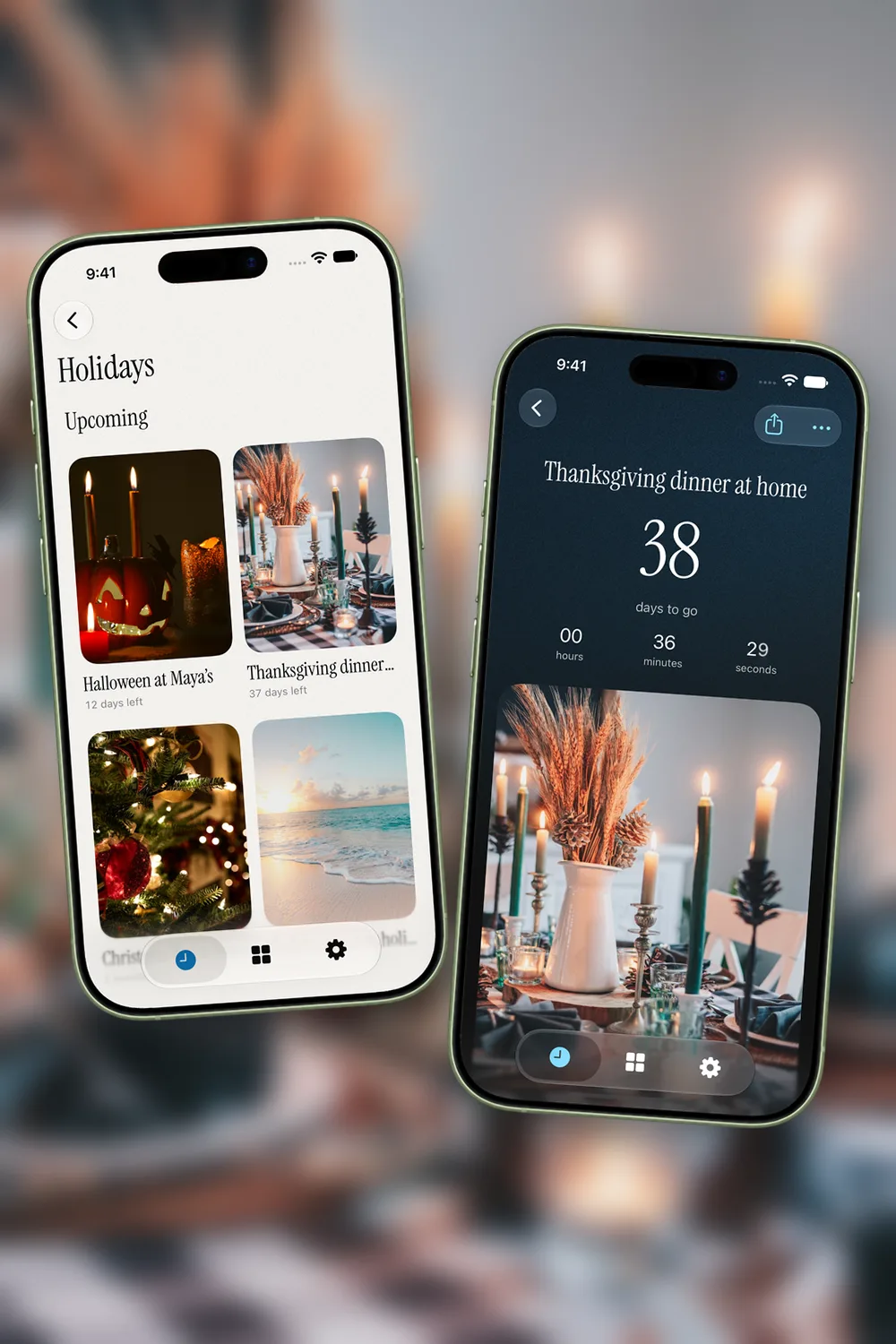
You can use a silent video loop of up to five seconds instead of a photo. Antici uses the first five seconds of a longer video, and its widget shows a still cover. The photo and video countdown guide explains that setup in detail.
Choose the reminders and widget you need
In Antici, open Settings, then Notifications. Under Before, choose from 15 minutes, 1 hour, 1 day and 1 week. These advance reminder choices apply across the moments with Remind me enabled; they are shared settings, rather than a separate timing menu for each plan. Leave only the lead times you want enabled. If you do not want alerts for the return journey, turn off Remind me on that moment.
A reminder one day before departure can be a cue to review your own preparations. It does not track a flight, store tickets or create a packing checklist. Notifications also need permission on your iPhone, and a lead time that has already passed will not produce a new advance reminder.
For a countdown you can glance at, add Antici's small Home Screen widget. Touch and hold the widget, choose Edit Widget and select the saved moment. Start with your departure if that is the next date you care about. After you arrive, you can select dinner instead. The countdown widget guide covers installation and selection step by step.
The small widget is included in the free app. Medium and large Home Screen layouts and Lock Screen widgets require Antici Premium. Choose a photo with a clear subject so the selected plan is easy to recognize at a small size.
Bring Christmas plans into the same approach
Christmas Day falls on December 25, but a family dinner on Christmas Eve, a flight on December 23 or a gathering the following weekend needs its own date. Save the plan you will actually attend. You do not need an extra December 25 moment unless the holiday itself is something you want to track.
For example, “Christmas at home” could point to your confirmed December 24 gathering, while “Leave for Christmas” points to your booked departure. Give each its own photo and use a Christmas category if that helps you find them later. Check your remaining free slots before adding more moments; Premium includes unlimited moments.
Keep one-time travel and gatherings on Never. If you want an annual Christmas Day countdown on December 25, you can use Yearly. A dinner that happens on a different day each year should be checked and entered for that year's plans.
Update changed plans and check next year's dates
If a departure moves, edit that moment's date and time in Antici. Then check dinner and the return separately. Those other moments will keep their saved dates until you change them. Antici does not import airline changes or automatically follow edits you make in Apple Calendar.
Thanksgiving needs an extra check next year. The US holiday is the fourth Thursday in November, which is November 25 in 2027. Antici's Yearly setting advances a calendar year; it does not calculate that fourth-Thursday rule. Keep the current Thanksgiving plan on Never, then confirm the next year's holiday and gathering dates before saving them.
Start with one confirmed plan, a title you recognize and the correct time. Add the other moments as the details become certain, then choose the next one you want to see in your widget.
Give your next date a photo.
Antici for iPhone requires iOS 26 or later. Start with up to five moments and a small Home Screen widget in the free app.