· 6 min read
Set reminders in Antici and fix missing alerts
Set reminders in Antici, choose shared alert times, and check iPhone notification permission. Follow a practical checklist when a moment's alert is missing.

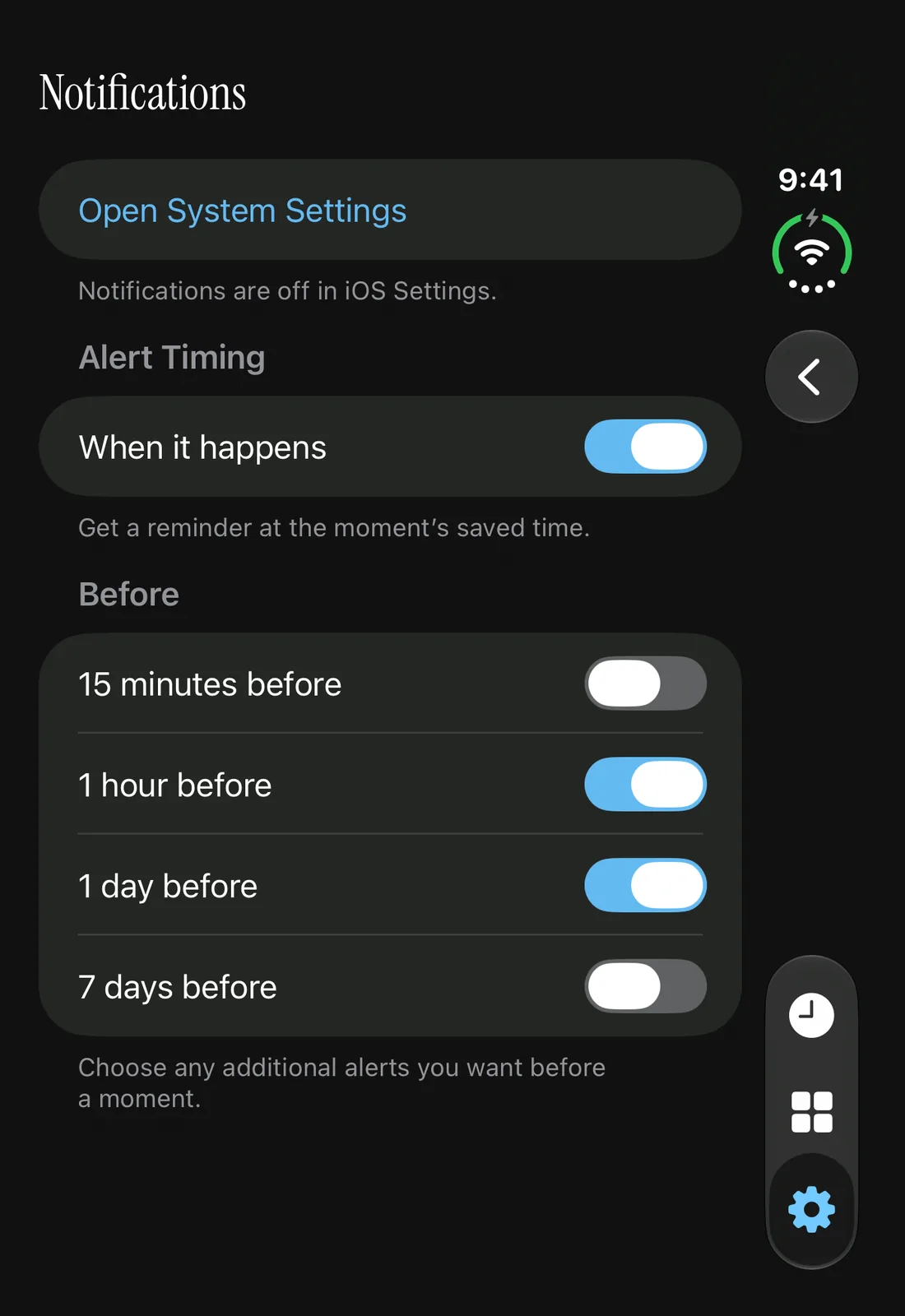
To set a reminder in Antici, turn on Remind me for the moment and save it. Choose your alert times in Antici Settings → Notifications, and allow Antici notifications in iPhone Settings. The moment switch, shared timing choices and iPhone permission each control a different part of the setup.
Reminders are included in the free app on iPhone with iOS 26 or later. You can use them without a widget. If you are starting from an empty library, follow the first-moment guide, then choose the alerts you want below.
Enable reminders for a moment
- Open your saved moment from Timeline or Moments.
- Tap More, the ellipsis button, then Edit.
- Check Date and Time, including the year. A midnight time means the start of that day.
- Turn on Remind me and tap Save, shown as a checkmark.
- If iPhone asks whether Antici can send notifications, choose Allow to receive them.
You can also turn on Remind me while creating a new moment. If you decline permission, Antici still saves the moment, with its reminders turned off. You do not need to create it again.
After restoring permission in iPhone Settings, return to that saved moment, choose More → Edit, turn Remind me back on and Save. Allowing the app at the iPhone level does not turn an individual moment's saved switch back on.
Choose shared alert times
Open Antici Settings, the gear tab, then Notifications. Under Alert Timing, When it happens controls the alert at your moment's saved date and time. Under Before, choose any advance alerts you want:
- 15 minutes before
- 1 hour before
- 1 day before
- 7 days before, meaning one week
You can select more than one. For example, for a Friday dinner saved at 7:00 p.m., 1 day before points to Thursday at 7:00 p.m., and 1 hour before points to Friday at 6:00 p.m. Choose the actual dinner time rather than leaving the moment at midnight.
These choices apply across moments with Remind me enabled. They take effect from Settings without another Save button; they are not a different advance schedule for each moment. To keep a dinner reminder but silence a vacation countdown, leave the shared times as you want them and turn off Remind me on the vacation moment.
On a new installation, When it happens starts on, with 1 day before and 1 hour before selected. Your existing preferences may differ. If every Before choice is off, When it happens can still notify you. If that switch and all advance choices are off, there is no selected alert time, even when the moment's Remind me switch is on.
Check which alerts are still ahead
Antici schedules alerts whose firing time is still in the future. Enabling a reminder does not recreate an advance alert that has already passed.
If a dinner is two hours away, its 1 day before alert is already behind you. A selected 1 hour before alert can still be ahead. When it happens can also remain useful at the saved dinner time. Past moments do not receive a new notification for their original date.
If plans change, edit the existing moment's Date and Time and Save. Check those values before changing notification settings: a correct reminder choice attached to the wrong year or time still points to the wrong plan.
Fix a missing or silent alert
Start with the saved moment and work outward. The screenshot above shows why a timing switch alone is not enough: advance alerts are selected, but the page explicitly says notifications are off in iOS Settings.
- Check the moment's Date, Time and Remind me switch. Save any change, and confirm that the alert you expect is still in the future.
- Open Antici Settings → Notifications. Check When it happens and the Before choices. If the editor says No reminder times are selected in Settings, enable a timing you want to use.
- If Antici shows Notifications are off in iOS Settings, tap Open System Settings. In your iPhone notification settings, allow Antici to send notifications. You can also open iPhone Settings → Notifications → Antici → Allow Notifications.
- If permission is already allowed, check the alert presentation and sound settings you want. Review whether Antici is included in Scheduled Summary, which can collect notifications for later delivery. Apple's notification settings guide explains those controls.
- Check the active Focus under iPhone Settings → Focus. Review its Apps choices to see whether Antici is allowed or silenced. Apple's Focus guide covers that separate setting.
- After fixing permission, reopen Antici and edit the affected moment. Turn Remind me on and Save so that moment is included again.
Antici uses ordinary notifications. Its reminder switch does not bypass Focus, turn a silent alert into an alarm or override your iPhone's delivery choices. You do not need to leave the app open for an alert it has already scheduled; iOS can present scheduled local notifications while an app is not running.
If an alert is still missing, visit Antici Support. Include your iOS and Antici versions, the saved date and time, the alert you expected and whether a banner, sound or notification-list entry appeared. Those details help support investigate what happened.
Repeating moments and larger libraries
Repeats changes the moment's next occurrence; it does not send a daily message counting down to a fixed date. After an occurrence passes, open Antici again so it can advance the repeating moment and prepare the next schedule. The birthday guide explains the yearly-date use case.
If you keep many upcoming moments, Antici schedules a batch of up to 64 future alerts, rather than unlimited alerts at once. Saved-time alerts take priority, followed by the nearest advance alerts. Several selected timings can use several alerts for one moment. Choose the advance times you need and return to Antici as plans progress so it can refresh the upcoming schedule.
Give your next date a photo.
Antici for iPhone requires iOS 26 or later. Start with up to five moments and a small Home Screen widget in the free app.